
iCat resource
Pack-Out Inventory: Automated Pack-Out List Software

Automated pack-out list software helps contents restoration teams capture inventory once in the field and keep that information useful through receiving, production, storage, and pack-back. With iCat, technicians can photograph contents on a mobile device, use AI assistance to identify items and generate descriptions, then review the result instead of rebuilding a list from memory.
Call 1-888-494-4228 to see how iCat can simplify your pack-out workflow
What should automated pack-out list software do?
Automated pack-out list software should turn field photos and useful identifiers into a connected contents record that supports the next operational step. It should reduce repetitive entry without replacing technician judgment or forcing every item into the same workflow.
A practical platform should help a contractor:
Capture item photos, room or source location, and useful inventory details at the property. Use AI to assist with item identification and descriptions, then review the output for accuracy. Use optional barcodes or box labels when they improve tracking for restorable or stored contents. Keep general contents inventory separate from restoration-service estimating and non-salvage valuation. Make digital picklists and current production status available to the team. Carry the record through storage, retrieval, and pack-back instead of creating a new list at each handoff.
These capabilities make the list an operational record, not just a document of what left the property. For a broader view of platform selection, see this contents restoration software selection guide.
The best workflow also makes the next action obvious. A field technician should know that a completed photo capture is ready for facility use. A receiving team should know which contents are expected. A production manager should see what is waiting for examination, and a pack-back crew should be able to find the selected items without searching through disconnected folders. This continuity reduces repeated entry and gives managers a clearer view of work in motion. It also keeps exceptions focused on the few records that need attention instead of making every job feel like a manual reconciliation exercise.
How does automated pack-out list software support field-to-pack-back work?
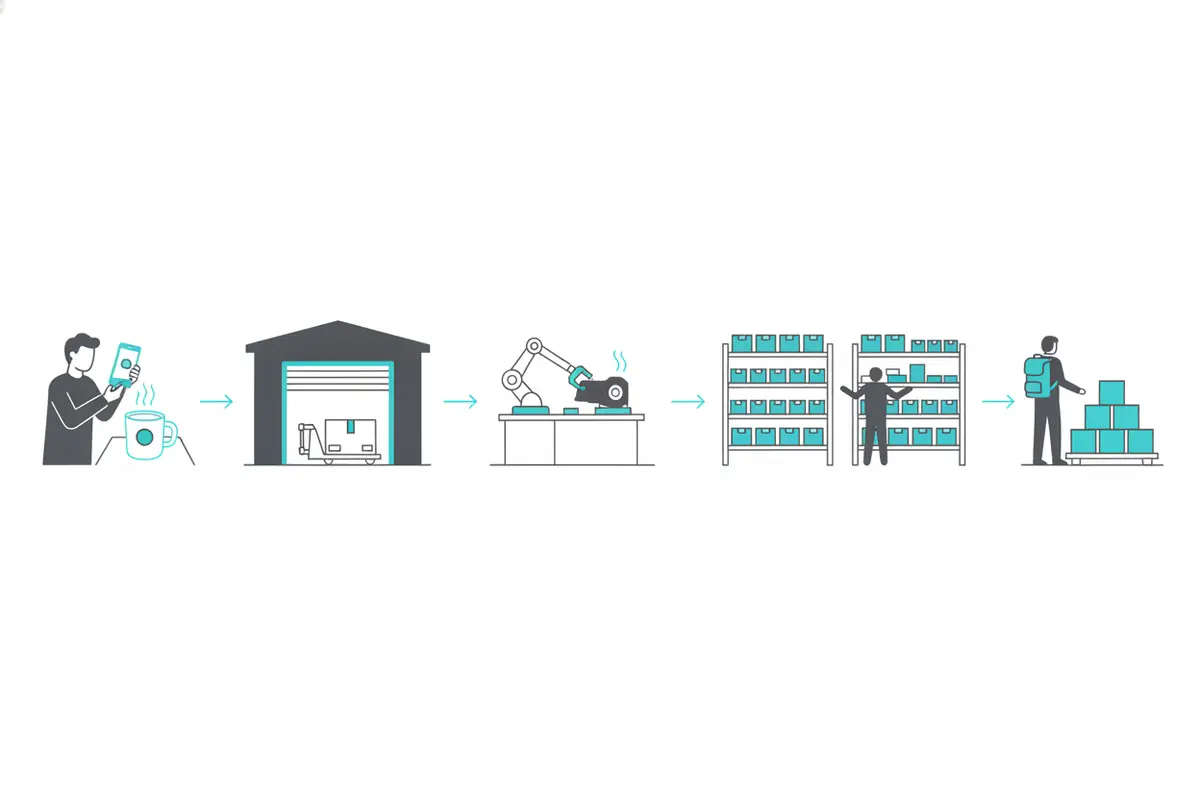
Automated pack-out list software supports field-to-pack-back work by keeping item identity, photos, location, and status connected as contents move through the operation. The team captures information once, then uses the same record to coordinate the next stage.
1. Capture contents with photos instead of starting with manual descriptions
At the property. A technician can photograph an item while it is accessible and add the room or source location. iCat uses AI assistance to identify contents and generate useful descriptions from the photos. The technician or manager can review the result, correct a missed detail, and keep the inventory tied to the right image.
This approach reduces manual field entry while preserving professional review. It also helps teams avoid vague records such as "miscellaneous" when a clearer item description is practical. The goal is a recognizable inventory record, not unnecessary data entry.
2. Add identifiers when the workflow benefits from them
Barcodes are useful when a contractor needs to track restorable contents, boxes, or stored materials through a facility. They are not required for every workflow, and non-salvage inventory does not need to become a barcode project simply because labels are available.
Use the identification method that fits the job. An item photo, box label, barcode, or QR code can help the team distinguish similar contents and retrieve the correct record later. The important point is continuity between the physical contents and the digital record.
3. Receive and route work without recreating the inventory
When contents reach the facility, receiving staff can use the existing inventory to confirm what arrived and flag a material discrepancy for review. Managers can then use digital picklists and current statuses to route work to the appropriate production area.
Inventory and production are connected but not identical. The inventory identifies and tracks the contents. Facility staff make cleaning and handling decisions after examining the items. The software reports information for the team; it does not decide whether an item is salvageable.
4. Track storage and organize pack-back
As contents move into storage, the team can maintain a usable location record. When pack-back begins, digital picklists help staff identify what to retrieve and stage. Current statuses help the office and field team coordinate without asking someone to reconstruct the job from separate notes.
Pack-back still requires physical verification. The connected record makes the check faster and clearer by showing what was selected, where it should be, and which exceptions remain. See the detailed contents job workflow from pack-out to completion for more on the full handoff sequence.
Which details belong on the list, and which belong elsewhere?
A general contents inventory should identify and track contents through the job. It should not be overloaded with information that belongs to estimating, facility decisions, or the separate non-salvage and LKQ valuation workflow.
| Workflow record | Purpose | Useful information | Operational boundary |
|---|---|---|---|
| General contents inventory | Identify and manage contents | Photo, description, room or source location, item or box identifier, relevant status | Can the team identify and locate the contents? |
| Pack-out and receiving | Track movement from property to facility | Expected items or boxes, receipt status, material exceptions | Does the facility know what arrived? |
| Production tracking | Coordinate work after facility examination | Assignment, current status, applicable work details | Has the appropriate team assessed the contents? |
| Non-salvage and LKQ valuation | Handle the separate replacement workflow | Item-specific rationale, replacement or LKQ information, age or depreciation where applicable | Is the disposition and authorization status clear? |
| Estimating and service records | Support estimates for work performed | Applicable quantities and services for pack-out, pack-back, storage, transportation, and related work | Can the estimator see what was done? |
Replacement cost, depreciation, age, and valuation details are not required on every general inventory line. When contents are determined to be non-salvage, move them into the distinct disposition and valuation process. Keep item-specific rationale, pending exceptions, and authorization visible. The non-salvage contents processing guide covers that branch in more depth.
How can contractors make AI-assisted inventory dependable?
AI-assisted inventory becomes dependable when teams combine fast capture with a short review routine and clear operating boundaries. The goal is to remove repetitive typing while keeping the information accurate enough for the next person who uses it.
- Capture a clear photo. Photograph the item so the software and the next technician can recognize it. Add another view when the first image does not show the relevant detail.
- Review AI-generated information. Confirm the description and correct errors caused by an unclear image, unusual item, or incomplete capture. AI should reduce typing, not remove professional oversight.
- Use identifiers selectively. Apply a barcode, QR code, or box label when it helps with receiving, storage, or retrieval. Do not require labels for workflows where a photo and record are sufficient.
- Keep statuses meaningful. Separate inventory status from production status, storage location, and non-salvage disposition. One status should not represent several different operational conditions.
- Use the digital picklist at pack-back. Retrieve and stage the selected contents from the current record, then verify the physical items and record any unresolved exception.
iCat supports offline mobile work on supported iOS devices, including iPhone and iPad workflows where supported. Teams can capture inventory without dependable connectivity and sync when a connection is available. That matters when technicians are working in properties where cellular or Wi-Fi service is limited.
For more field guidance on photos, descriptions, and location details, review these restoration field inventory best practices. This contents processing guide for restoration technicians can also help structure a consistent capture routine.
What should you evaluate before choosing pack-out inventory software?
Choose pack-out inventory software by following one realistic contents job from field capture through pack-back. The strongest platform is not the one with the longest feature list. It is the one that helps field staff, facility teams, and managers use the same understandable record.
Photo and AI capture: Can a technician photograph contents quickly, receive useful descriptions, and review the result without rebuilding the inventory manually? Offline mobile access: Can the field team work on supported iPhone or iPad devices when the property has limited connectivity? Optional tracking: Can the operation use barcodes or box labels where they add value without making them mandatory for every inventory? Connected workflow: Do the same records support receiving, production, storage, digital picklists, and pack-back? Clear boundaries: Does the platform keep general inventory separate from service estimating and non-salvage or LKQ valuation? Human review: Can staff correct AI-assisted descriptions and make the decisions that software should not make, including salvageability and facility handling? Data access:* Does the product offer an integration path or API as the operation grows? Review iCat's API information as one source for its developer access.
Ask a vendor to demonstrate a field photo, an AI-assisted description, optional item or box identification, facility receipt, production routing, storage retrieval, and pack-back staging. That sequence shows whether the platform connects the operation or simply digitizes a list.
iCat describes its offering as a contents restoration software platform built around connected inventory and production workflows, including digital picklists and status tracking.
Talk to an iCat contents restoration software expert about your workflow
Frequently Asked Questions
What is automated pack-out list software?
It is software that helps restoration teams capture contents information digitally and use the same records to coordinate receiving, production, storage, and pack-back. Modern platforms can use photos and AI assistance to reduce manual description work.
Does every pack-out item need a barcode?
No. Barcodes can help track restorable or stored contents, boxes, and retrieval activity, but they are optional for workflows where photos, descriptions, and locations provide enough identification.
Does AI decide whether an item is salvageable?
No. AI can assist with item identification and descriptions, while the software reports condition and related information. Qualified restoration staff decide whether contents are salvageable and what facility work is appropriate.
Can iCat work when a technician is offline?
iCat supports offline mobile work on supported iOS devices, including iPhone and iPad workflows where supported. Captured information can sync when Wi-Fi or cellular connectivity becomes available.
Should every inventory line include replacement value?
No. A general contents inventory supports identification, location, and movement. Replacement or LKQ research, age, depreciation, and applicable valuation details belong to the separate workflow for contents determined to be non-salvage.
Connect the pack-out to the work that follows
A pack-out inventory should do more than show what left a property. With AI-assisted photo capture, optional barcode tracking, offline mobile workflows, digital picklists, and current status information. ICat helps contents restoration teams carry one useful record from field inventory through receiving, production, storage, and pack-back.